

Blocks Blocks
  • Home 
    • Creative Helpdesk 
    • Cool Knowledge base 
    • Focused Helpdesk 
    • Classic Helpdesk 
    • Book Chapters / Tutorials 
    • User Manuals 
    • Light Knowledge base 
    • Support Forum 
    • Multi Helpdesk 
  • Documentation 
    • OnePage Documentation 
    • Elements
      • Tabs Widget 
      • Table Widget 
      • Notice / Message Widget 
      • Accordions Widget 
      • Cheatsheet Widget 
      • Image Hotspots Widget 
    • Content
      • Changelogs Timeline 
      • Video Widget 
      • Keyboard Shortcuts 
      • Password Protected (Demo) 
      • Tooltip & Direction 
      • List Items Style 
    • Code
      • Dark Theme 
      • Default Theme 
      • Funky Theme 
      • Okaidia Theme 
      • Twilight Theme 
    • Footnotes
      • Single Comun 
      • Two Columns 
      • Three Columns 
      • Four Columns 
    • Layouts
      • No Right Sidebar 
      • Full-width Layout 
      • Aesthetic Banner Design 
      • Comment Closed 
  • Forum 
    • Forums 
    • Forum Topics 
    • Topic Details 
    • Ask Question 
    • User Profile 
  • Pages 
    • Login (Elementor) 
    • Sign in 
    • Sign up 
    • Docs
      • Two Column 
      • Three Column 
      • Four Column 
      • Single Docs 
      • Multi Doc Tabs 
    • Search Results 
    • 404 Error 
  • Blog 
    • Blog Page
      • List Layout 
      • Grid Layout 
    • Single Details
      • Colorful Banner 
      • Banner Image 
      • TOC Layout 
      • Video with TOC 
    • Categories 
  • Shop 
    • Product Details 
    • Cart 
    • Checkout 
    • My account 
Get Docy
Blocks Blocks
Get Docy
Blocks
  • Home 
    • Creative Helpdesk 
    • Cool Knowledge base 
    • Focused Helpdesk 
    • Classic Helpdesk 
    • Book Chapters / Tutorials 
    • User Manuals 
    • Light Knowledge base 
    • Support Forum 
    • Multi Helpdesk 
  • Documentation 
    • OnePage Documentation 
    • Elements
      • Tabs Widget 
      • Table Widget 
      • Notice / Message Widget 
      • Accordions Widget 
      • Cheatsheet Widget 
      • Image Hotspots Widget 
    • Content
      • Changelogs Timeline 
      • Video Widget 
      • Keyboard Shortcuts 
      • Password Protected (Demo) 
      • Tooltip & Direction 
      • List Items Style 
    • Code
      • Dark Theme 
      • Default Theme 
      • Funky Theme 
      • Okaidia Theme 
      • Twilight Theme 
    • Footnotes
      • Single Comun 
      • Two Columns 
      • Three Columns 
      • Four Columns 
    • Layouts
      • No Right Sidebar 
      • Full-width Layout 
      • Aesthetic Banner Design 
      • Comment Closed 
  • Forum 
    • Forums 
    • Forum Topics 
    • Topic Details 
    • Ask Question 
    • User Profile 
  • Pages 
    • Login (Elementor) 
    • Sign in 
    • Sign up 
    • Docs
      • Two Column 
      • Three Column 
      • Four Column 
      • Single Docs 
      • Multi Doc Tabs 
    • Search Results 
    • 404 Error 
  • Blog 
    • Blog Page
      • List Layout 
      • Grid Layout 
    • Single Details
      • Colorful Banner 
      • Banner Image 
      • TOC Layout 
      • Video with TOC 
    • Categories 
  • Shop 
    • Product Details 
    • Cart 
    • Checkout 
    • My account 

Docy Documentation

  • Elements
    • Tabs Widget
    • Notice / Message Widget
    • Accordions Widget
    • Cheatsheet Widget
    • Image Hotspots Widget
  • Content
    • Video Widget
    • Table Widget
    • Tooltip & Direction
    • Password Protected doc
    • Keyboard Shortcuts
    • List Items Style
  • Code Syntax Highlight
    • Code Dark Theme
    • Code Default Theme
    • Code Tomorrow Theme
    • Code Okaidia Theme
    • Code Twilight Theme
  • Layouts
    • Aesthetic Banner Design
    • No Search Banner
    • Full-width Layout
    • Full-width No Right Sidebar
    • Comment Closed
  • Footnotes
    • Footnote Default
    • Footnote 2 Columns
    • Footnote 3 Columns
    • Footnote 4 Columns
  • Changelogs
    • Changelogs Timeline
    • 2nd Depth
      • 3rd Depth
      • 3rd Depth Two
    • Demo Import
    • Plugins Installation
  • FAQs
    • How to Paginate a Post?
    • How to set site’s favicon?
    • How to apply custom CSS code.
loading
Popular Searches
  • Getting
  • WordPress
  • Layout
  1. Home
  2. Docy Documentation
  3. FAQs
  4. How to Paginate a Post?
Updated on July 27, 2022

Docy Documentation

  • Elements
    • Tabs Widget
    • Notice / Message Widget
    • Accordions Widget
    • Cheatsheet Widget
    • Image Hotspots Widget
  • Content
    • Video Widget
    • Table Widget
    • Tooltip & Direction
    • Password Protected doc
    • Keyboard Shortcuts
    • List Items Style
  • Code Syntax Highlight
    • Code Dark Theme
    • Code Default Theme
    • Code Tomorrow Theme
    • Code Okaidia Theme
    • Code Twilight Theme
  • Layouts
    • Aesthetic Banner Design
    • No Search Banner
    • Full-width Layout
    • Full-width No Right Sidebar
    • Comment Closed
  • Footnotes
    • Footnote Default
    • Footnote 2 Columns
    • Footnote 3 Columns
    • Footnote 4 Columns
  • Changelogs
    • Changelogs Timeline
    • 2nd Depth
      • 3rd Depth
      • 3rd Depth Two
    • Demo Import
    • Plugins Installation
  • FAQs
    • How to Paginate a Post?
    • How to set site’s favicon?
    • How to apply custom CSS code.

How to Paginate a Post?

Estimated reading: 1 minute 215 views

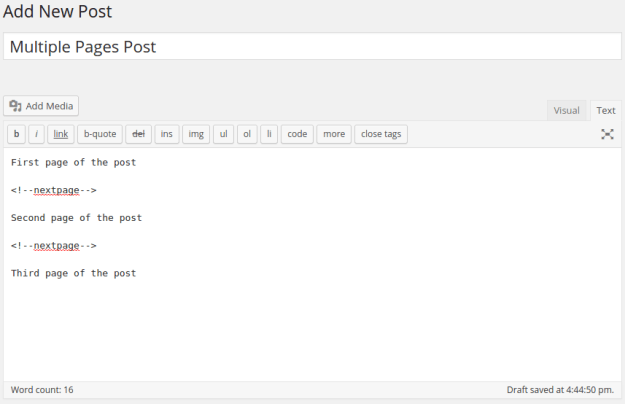
In order to paginate your blog post or page, in the Write panel in your WordPress admin, switch to the TEXT view (if you are using the Visual view) and then enter the following code to wherever you want to break the post up into a new page:

<!--nextpage-->
Still stuck? How can we help?

How can we help?

Was this page helpful? Yes 2 No

CONTENTS

Powered By EazyDocs

Leaf Illustration

© 2021 All Rights Reserved by Spider-Themes